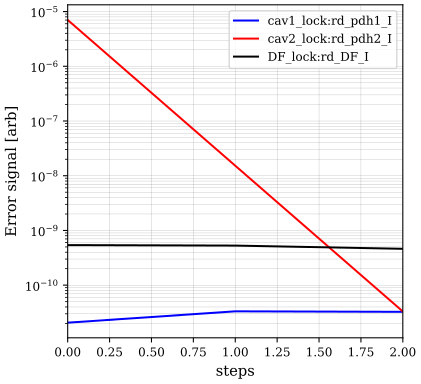
Locking actions
This example demonstrates the use of various locking-related actions. See also the Actions, Analyses, and Solutions introduction for an introduction into actions, and Tuning for detailed documentation of locking actions.
The Finesse model
Defining a simple interferometer.
import finesse
from finesse.analysis.actions import GetErrorSignals, CheckLinearity, RunLocks, DragLocks
from finesse.analysis.actions import SensingMatrixDC, OptimiseRFReadoutPhaseDC
from finesse.analysis.actions.locks import SetLockGains
finesse.configure(plotting=True)

kat = finesse.Model()
kat.parse(
    """
    # Adding a laser and modulator for use in
    # Pound-Drever-Hall-like signals.
    l L0 P=1
    s l_mod1 L0.p1 eo1.p1
    mod eo1 10M 0.1

    s s0 eo1.p2 BS.p1
    bs BS R=0.5 T=0.5

    # North Arm
    s s1 BS.p2 NI.p1
    m NI R=0.99 T=0.01 Rc=1429 phi=90
    s CAV NI.p2 NE.p1 L=10
    m NE R=0.991 T=0.009 Rc=1430 phi=90

    #East Arm
    s s2 BS.p3 EI.p1
    m EI R=0.99 T=0.01 Rc=1429 phi=0
    s CAV2 EI.p2 EE.p1 L=10
    m EE R=0.991 T=0.009 Rc=1430 phi=0

    dof NEz NE.dofs.z +1
    dof EEz EE.dofs.z +1
    dof NIz NI.dofs.z +1

    readout_rf rd_pdh1 NI.p1.o f=10M
    readout_rf rd_pdh2 EI.p1.o f=10M
    readout_rf rd_DF BS.p4.o f=10M

    # Two locks to put the cavities in resonance, and
    # one to move to the dark fringe.
    lock cav1_lock rd_pdh1.outputs.I NEz.DC 1 1e-9
    lock cav2_lock rd_pdh2.outputs.I EEz.DC 1 1e-9
    lock DF_lock rd_DF.outputs.I NIz.DC 1 1e-9

    cav cav1 NI.p2.o
    cav cav2 EI.p2.o
    modes(maxtem=5)
    """
)
<finesse.model.Model at 0x7ed7561e5010>
Using different Actions
As currently set up, the interferometer is in its locked condition. Let’s kick it slightly away from this lock to see how the locking actions work.
kat.NEz.DC += 0.01
kat.EEz.DC += 0.001
GetErrorSignals
Use GetErrorSignals to quickly see the error signals of the locks in a model
at its current state. If particular locks are not specified, the error
signals for all of them will be given.
sol_errs = kat.run(GetErrorSignals("cav1_lock", "DF_lock"))
print("Initial Error Signals:", sol_errs.results, end="\n\n")
Initial Error Signals: [-1.91529891e-03 -3.68269613e-11]
OptimiseRFReadoutPhaseDC
Use OptimiseRFReadoutPhaseDC to determine and set the optimal demodulation
phase for particular pairs of DOFs and RF readouts. If no pairs are specified, the
demodulation phases for all locks will be optimised. Initial and optimal readout phases
can be extracted from the solution object or by setting verbose=True.
sol_phases = kat.run(
    OptimiseRFReadoutPhaseDC(
        "NEz", "rd_pdh1_I", "EEz", "rd_pdh2_I", "NIz", "rd_DF_I", verbose=True
    )
)
┌──────────────────╥─────────┬─────────┬───────┐
│                  ║ rd_pdh1 │ rd_pdh2 │ rd_DF │
╞══════════════════╬═════════╪═════════╪═══════╡
│ Previous phases  ║       0 │       0 │     0 │
├──────────────────╫─────────┼─────────┼───────┤
│ Optimised phases ║   179.8 │   179.8 │ 179.3 │
└──────────────────╨─────────┴─────────┴───────┘
Note that each readout phase can only be optimised to a single
DegreeOfFreedom. If a readout is paired with multiple DOFs, its phase
will be optimised to the first DegreeOfFreedom given and others are
ignored during this step:
kat.run(OptimiseRFReadoutPhaseDC("NEz", "rd_pdh1_I", "EEz", "rd_pdh1_I"));
/usr/local/lib/python3.13/site-packages/finesse/analysis/actions/sensing.py:241: OptimiseRFReadoutPhaseDCMultipleDofWarning: Readout 'rd_pdh1' is paired with multiple drives. Demodulation phase will be optimised using the first drive ('NEz.DC'), ignoring drive(s) 'EEz.DC'.
  warn(
SetLockGains
Use SetLockGains to determine and set the gains for particular locks. If
no locks are specified, all enabled locks in the model are used. Gains are automatically
calculated in RunLocks when using the Newton method.
kat.run(SetLockGains())
<SeriesSolution of series @ 0x7ed753682430 children=0>
SensingMatrixDC
Use SensingMatrixDC to calculate the entire sensing matrix. This action
is also called within RunLocks when using the Newton method.
sol_matrix = kat.run(SensingMatrixDC(["NEz", "EEz", "NIz"],
                                     ["rd_pdh1", "rd_pdh2", "rd_DF"]))
print("Sensing Matrix:", sol_matrix, end="\n\n", sep="\n")
Sensing Matrix:
┌─────╥───────────┬───────────┬───────────┬───────────┬──────────┬──────────┐
│     ║ rd_pdh1_I │ rd_pdh1_Q │ rd_pdh2_I │ rd_pdh2_Q │ rd_DF_I  │ rd_DF_Q  │
╞═════╬═══════════╪═══════════╪═══════════╪═══════════╪══════════╪══════════╡
│ NEz ║      0.19 │   1.5E-09 │         0 │         0 │  1.1E-08 │  1.1E-08 │
├─────╫───────────┼───────────┼───────────┼───────────┼──────────┼──────────┤
│ EEz ║         0 │         0 │      0.19 │  -8.1E-10 │ -4.7E-09 │ -1.1E-08 │
├─────╫───────────┼───────────┼───────────┼───────────┼──────────┼──────────┤
│ NIz ║     -0.19 │  -1.5E-09 │         0 │         0 │  1.2E-06 │ -5.6E-12 │
└─────╨───────────┴───────────┴───────────┴───────────┴──────────┴──────────┘
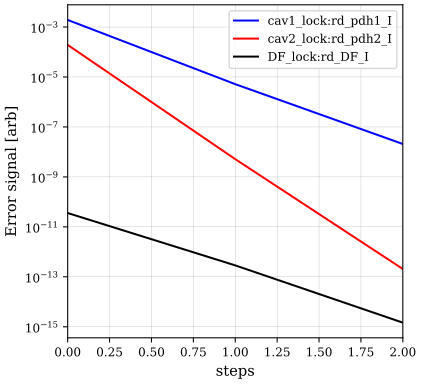
CheckLinearity
Use CheckLinearity to plot the error signals as a function of each DOF
independently. When locking, we assume that these plots are either linear
or of very small slope (like, in this case, the bottom middle plot).
kat.run(CheckLinearity(plot_results=True))
<CheckLinearitySolution of run locks @ 0x7ed75355f000 children=0>
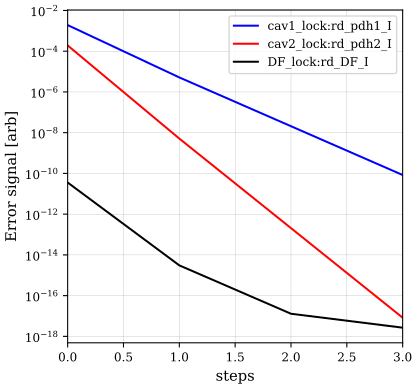
RunLocks
Use RunLocks to adjust the lock DOFs until the error signals
are within tolerances or until max iterations are reached. This can be done with
either the proportional method or the more advanced newton method
(see RunLocks for more information).
kat.run(
    RunLocks(
        method="newton",
        display_progress=False,
        max_iterations=100,
        scale_factor=1
    )
).plot()
DragLocks
Use DragLocks to gradually introduce a substantial defect in your
model, which you might not be able to lock to immediately.
print("Results of dragging locks:")
kat.run(OptimiseRFReadoutPhaseDC())
kat.run(
    DragLocks(
        method="newton",
        parameters=["NE.Rcx"],
        stop_points=[2],
        relative=True,
        max_iterations=100,
    )
).plot()
Results of dragging locks: