Frequency Response
This page gives an overview of the four different “FrequencyResponse” actions which can be used to calculate transfer functions in Finesse. See also the section on signal modelling for additional background information
For a detailed overview with example code, see Calculating general transfer functions. The
following examples also showcase FrequencyResponse:
Finally you can find a more general overview on transfer functions on Transfer Functions and Error Signals.
The different frequency response actions differ mainly in the type of nodes used as input and output for the transfer function calculation. See Basic usage of ports and nodes for an overview of the difference between node types.
Input and output nodes
Action Name |
Input Nodes |
Output nodes |
|---|---|---|
Electrical/Mechanical |
Electrical/Mechanical |
|
Optical |
Electrical/Mechanical |
|
Optical |
Optical |
|
Electrical/Mechanical |
Optical |
Solution indexing
Below is a quick overview of the indexing of the out attribute of the
FrequencyResponseSolution returned by the analyses on this page.
Action Name |
Index 1 |
Index 2 |
Index 3 |
Index 4 |
Index 5 |
|---|---|---|---|---|---|
frequencies |
outputs |
inputs |
N/A |
N/A |
|
frequencies |
outputs |
inputs |
HOMs (input) |
N/A |
|
frequencies |
outputs |
inputs |
HOMs (output) |
HOMs (input) |
|
frequencies |
outputs |
inputs |
HOMs (output) |
N/A |
Model setup
Note that it is also possible to calculate transfer functions ‘manually’ using the
sgen to inject signals, this is described in
Computing transfer functions - manual method.
For this page we’ll use a simple cavity setup where one of the mirrors is suspended to demonstrate the differences between the different frequency response actions.
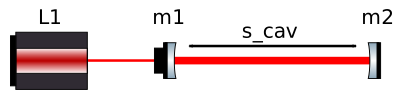
Fig. 11 Cavity setup
import numpy as np

import finesse
from finesse.analysis.actions import (
    FrequencyResponse,
    FrequencyResponse2,
    FrequencyResponse3,
    FrequencyResponse4,
)
from finesse.plotting import bode

finesse.init_plotting()

model = finesse.Model("""
l l1 P=1
s s1 l1.p1 m1.p1 L=1
m m1 R=0.9 T=0.1
s s2 m1.p2 m2.p1 L=1
m m2 R=0.9 T=0.1

pendulum pend m1 mass=1

fsig(1)
""")
Frequency Response
-
frequency_response
freqresp
FrequencyResponse Computes the frequency response of a signal injected at various nodes to compute transfer functions to multiple output nodes. Inputs and outputs should be electrical or mechanical nodes. It does this in an efficient way by using the same model and solving for multiple RHS input vectors.
This action does not alter the model state. This action will ignore any currently definied signal generator elements in the model. Produces an output transfer matrix from each input node to some readout output. The shape of the output matrix is: [frequencies, inputs, outputs] To inject into optical nodes please see
FrequencyResponse2andFrequencyResponse3. To read out optical nodes please seeFrequencyResponse3andFrequencyResponse4.- Syntax:
freqresp(f, inputs, outputs, carrier_solution=none, name='frequency_response')
- Required:
f: Frequencies to compute the transfer functions overinputs: Mechanical or electrical nodes to inject signal atoutputs: Mechanical or electrical nodes to measure output at- Optional:
carrier_solution: When provided these DC fields will be used to compute the signal matrix with. It is up to the user to input a sensible carrier field.name: Solution name
As mentioned above, FrequencyResponse calculates
transfer functions between signal nodes (electrical or mechanical). We define a range of
frequencies to sweep over and the input nodes (where the signal will be injected) and
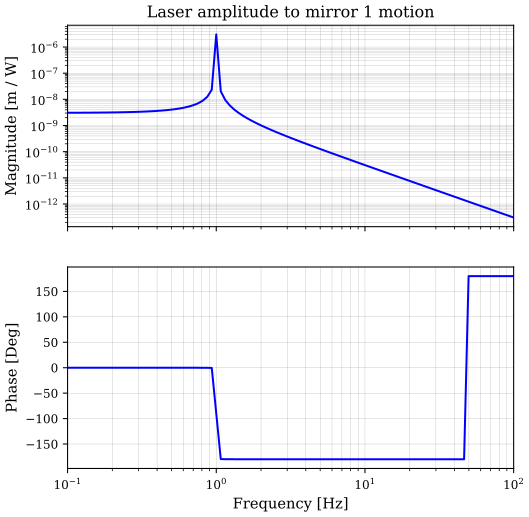
the output nodes (where the signal will be “measured”). In this case we will modulate
the laser amplitude to see the mechanical resonance of the suspended mirror.
f = np.geomspace(1e-1, 1e2, 100)
sol = model.run(
    FrequencyResponse(f, inputs=[model.l1.amp.i], outputs=[model.m1.mech.z])
)
Since both the input and the output nodes are signal nodes, their value is single
complex number and the resulting shape of the sol.out array is N_f x
N_inputs x N_outputs (see also Solution indexing).
print(sol.out.shape)
print(sol.f.shape)
print(sol.inputs)
print(sol.outputs)
(100, 1, 1)
(100,)
['l1.amp.i']
['m1.mech.z']
To plot the result, we use the bode utility function. We index the sol.out array
with [:, 0, 0] to select the transfer function from l1.amp.i to m1.mech.z.
Note that we can also select the transfer function using the node names, which is useful
if we are calculating multiple transfer functions at once.
np.allclose(sol["m1.mech.z", "l1.amp.i"], sol.out[:, 0, 0])
True
axs = bode(sol.f, sol.out[:, 0, 0], db=False)
axs[0].set_ylabel("Magnitude [m / W]")
axs[0].set_title("Laser amplitude to mirror 1 motion");
Frequency Response 2
-
frequency_response2
freqresp2
FrequencyResponse2 Computes the frequency response of a signal injected at an optical port at a particular optical frequency. This differs from
FrequencyResponsein the way the inputs and outputs are prescribed. ForFrequencyResponse2you specify optical input nodes and a signal output node.This action does not alter the model state. This action will ignore any currently definied signal generator elements in the model. Produces an output transfer matrix from each HOM at a particular frequency and optical node to some readout output. The shape of the output matrix is: [frequencies, outputs, inputs, HOMs] It should be noted that when exciting a lower signal sideband frequency it will actually return the operator for propagating the conjugate of the lower sideband. This is because FINESSE is internally solving for the conjugate of the lower sideband to linearise non-linear optical effects. To inject into mechanical and electrical nodes please see
FrequencyResponseandFrequencyResponse4. To readout optical nodes please seeFrequencyResponse3andFrequencyResponse4.- Syntax:
freqresp2(
    f,
    inputs,
    outputs,
    carrier_solution=none,
    name='frequency_response2'
)
- Required:
f: Frequencies to compute the transfer functions overinputs: Optical node and frequency tuple to inject at. A symbolic refence to the model’s fsig.f parameter should always be used when defining a frequency to look at.outputs: Mechanical or electrical (signal)nodes to measure output to- Optional:
carrier_solution: When provided these DC fields will be used to compute the signal matrix with. It is up to the user to input a sensible carrier field.name: Solution name
FrequencyResponse2 calculates transfers functions between optical nodes and signal
nodes. We can calculate the same transfer function as above with
freqresp, but now we use the outgoing optical field from the laser as an
input node. Since we are now injecting into an optical field, we have to add the
frequency at which we are injecting the signal. In most cases this will be the
signal frequency.
f = np.geomspace(1e-1, 1e2, 100)
sol = model.run(
    FrequencyResponse2(
        f, inputs=[(model.m1.p1.i, model.fsig.f.ref)], outputs=[model.m1.mech.z]
    )
)
The output shape has gained another dimension as opposed to freqresp,
since the optical field that we are injecting the signal into can in principle contain
multiple higher order modes. FrequencyResponse2 calculates the transfer function
from each mode of the input to every output node separately. In our case we are
modelling plane wave, therefore the size of this extra dimension is 1.
print(sol.out.shape)
print(sol.f.shape)
print(sol.inputs)
print(sol.outputs)
(100, 1, 1, 1)
(100,)
[(<OpticalNode m1.p1.i @ 0x7b8e31e83b10>, <Symbolic='fsig.f' @ 0x7b8e31c48110>)]
[<SignalNode m1.mech.z @ 0x7b8e31bcb770>]
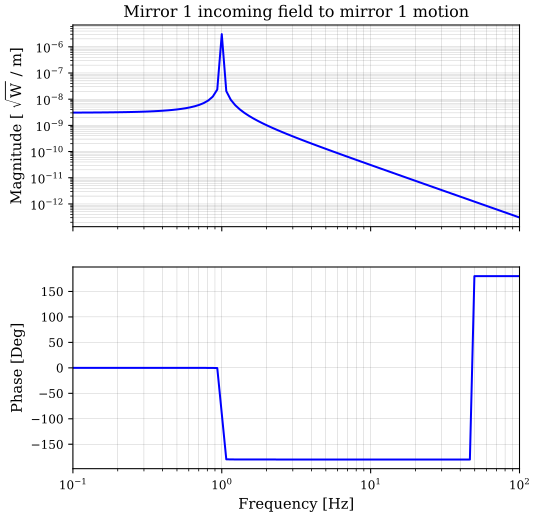
To plot the result, we provide an extra index. Note that the plot looks identical to the
example for freqresp.
axs = bode(f, sol.out[:, 0, 0, 0], db=False)
axs[0].set_ylabel("Magnitude [ $\\sqrt{\\mathrm{W}}$ / m]")
axs[0].set_title("Mirror 1 incoming field to mirror 1 motion");
Frequency Response 3
-
frequency_response3
freqresp3
FrequencyResponse3 Computes the frequency response of a signal injected at an optical port at a particular optical frequency. This differs from
FrequencyResponsein the way the inputs and outputs are prescribed. ForFrequencyResponse3you specify optical input nodes and optical output nodes.This action does not alter the model state. This action will ignore any currently definied signal generator elements in the model. Produces an output transfer matrix from each HOM at a particular frequency and optical node to some other optical node and frequency. The shape of the output matrix is: [frequencies, outputs, inputs, HOMs, HOMs] It should be noted that when exciting a lower signal sideband frequency it will actually return the operator for propagating the conjugate of the lower sideband. This is because FINESSE is internally solving for the conjugate of the lower sideband to linearise non-linear optical effects. To inject into mechanical and electrical nodes please see
FrequencyResponseandFrequencyResponse4. To readout mechanical and electrical nodes please seeFrequencyResponseandFrequencyResponse2.- Syntax:
freqresp3(
    f,
    inputs,
    outputs,
    carrier_solution=none,
    name='frequency_response3'
)
- Required:
f: Frequencies to compute the transfer functions overinputs: Optical node and frequency tuple to inject at. A symbolic reference to the model’s fsig.f parameter should always be used when defining a frequency to look at.outputs: Optical node and frequency tuple to measure output at. A symbolic reference to the model’s fsig.f parameter should always be used when defining a frequency to look at.- Optional:
carrier_solution: When provided these DC fields will be used to compute the signal matrix with. It is up to the user to input a sensible carrier field.name: Solution name
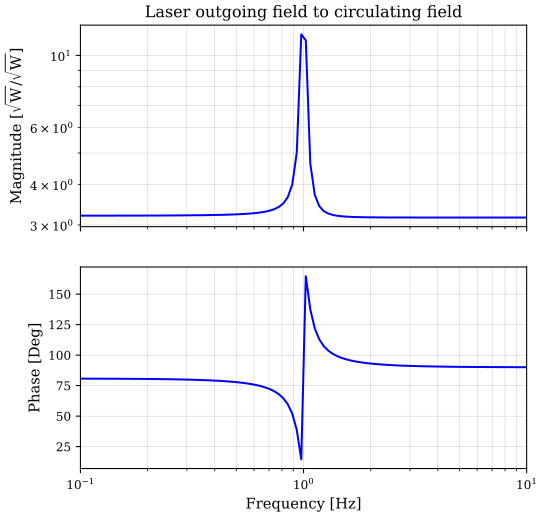
FrequencyResponse3 calculates transfer functions between optical nodes. Since
optical nodes have different complex amplitudes for every frequency and higher order
mode, we specify the inputs and outputs differently. We have to provide the frequency at
which we want to inject and measure the signal for every node. In most cases this will
be the signal frequency. We measure the transfer function
between the laser output field and the circulating field in the cavity. Since the cavity
is on resonance, the response will be strongest around the resonance frequency of the
suspended mirror.
f = np.geomspace(1e-1, 1e1, 100)
sol = model.run(
    FrequencyResponse3(
        f,
        inputs=[(model.l1.p1.o, model.fsig.f.ref)],
        outputs=[(model.m1.p2.o, model.fsig.f.ref)],
    )
)
The output shape has grown, since it contains separate transfer functions for every
combination of higher order modes. In this example, we are modelling in plane wave, such
that that the two extra dimension are both of size one, but in principle
FrequencyResponse3 allows us to calculate transfer functions between every mode
combination all at once. To plot the result, we index the .out array with [:, 0,
0, 0, 0], meaning: “all frequencies”, “first output node”, “first input node”, “first
output mode”, “first input mode”.
print(sol.out.shape)
print(sol.f.shape)
print(sol.inputs)
print(sol.outputs)
(100, 1, 1, 1, 1)
(100,)
[(<OpticalNode l1.p1.o @ 0x7b8e31e82c10>, <Symbolic='fsig.f' @ 0x7b8e30e7cad0>)]
[(<OpticalNode m1.p2.o @ 0x7b8e31ea7410>, <Symbolic='fsig.f' @ 0x7b8e3038a690>)]
f = np.geomspace(1e-1, 1e1, 100)
sol = model.run(
    FrequencyResponse3(
        f,
        inputs=[(model.l1.p1.o, model.fsig.f.ref)],
        outputs=[(model.m1.p2.o, model.fsig.f.ref)],
    )
)
axs = bode(f, sol.out[:, 0, 0, 0, 0], db=False)
axs[0].set_ylabel("Magnitude [$\\sqrt{\\mathrm{W}} / \\sqrt{\\mathrm{W}}$]");
axs[0].set_title("Laser outgoing field to circulating field");
Frequency Response 4
-
frequency_response4
freqresp4
FrequencyResponse4 Computes the frequency response of a signal injected at an electrical or mechanical port. This differs from
FrequencyResponsein the way the inputs and outputs are prescribed. ForFrequencyResponse4you specify signal input nodes and optical output nodes.This action does not alter the model state. This action will ignore any currently defined signal generator elements in the model. Produces an output transfer matrix from each signal node to each HOM at a particular frequency and optical node. The shape of the output matrix is: [frequencies, outputs, inputs, HOMs] It should be noted that when exciting a lower signal sideband frequency it will actually return the operator for propagating the conjugate of the lower sideband. This is because FINESSE is internally solving for the conjugate of the lower sideband to linearise non-linear optical effects. To inject into optical nodes please see
FrequencyResponse2andFrequencyResponse3. To readout mechanical and electrical nodes please seeFrequencyResponseandFrequencyResponse2.- Syntax:
freqresp4(
    f,
    inputs,
    outputs,
    carrier_solution=none,
    name='frequency_response4'
)
- Required:
f: Frequencies to compute the transfer functions overinputs: Mechanical or electrical node to inject signal atoutputs: Optical node and frequency tuple to measure output at. A symbolic reference to the model’s fsig.f parameter should always be used when defining a frequency to look at.- Optional:
carrier_solution: When provided these DC fields will be used to compute the signal matrix with. It is up to the user to input a sensible carrier field.name: Solution name
FrequencyResponse4 calculates transfer functions between signal nodes and optical
nodes, making it basically the reverse of freqresp2. The same comments
about specifying the signal frequency (this time for output
node) and the extra indexing for the higher order modes also apply. We recreate the same
transfer function as for freqresp3, but this time we are injecting into
the laser amplitude electrical input node instead of the laser outgoing field.
f = np.geomspace(1e-1, 1e1, 100)
sol = model.run(
    FrequencyResponse4(
        f,
        inputs=[model.l1.amp.i],
        outputs=[(model.m1.p2.o, model.fsig.f.ref)],
    )
)
axs = bode(f, sol.out[:, 0, 0, 0], db=False)
axs[0].set_ylabel("Magnitude [$\\sqrt{\\mathrm{W}} / \\mathrm{W}$]");
axs[0].set_title("Laser amplitude to circulating field");