Replacing KatScript components
For added flexibility when creating or adjusting models, it is possible to replace components in a model. To avoid subtle bugs and difficult to follow code, ‘replacing’ will always result in a new katscript string that you can use to build a new model. Your existing model will not be touched in any way!
We will first look at the intended usecase of this functionality: extending simplified
models with extra complexity. In the example below we prepared a Michelson model (but
could also be a full interferometer), with a designated nothing component as a
‘placeholder’.
from finesse import Model

model = Model(
    """
l l1

s LA l1.p1 PLACEHOLDER.p1
nothing PLACEHOLDER
s LB PLACEHOLDER.p2 central_bs.p1

bs central_bs R=0.5 T=0.5
s LW central_bs.p2 WE.p1 L=100
m WE R=0.9 T=0.1
s LN central_bs.p3 NE.p1 L=100
m NE R=0.9 T=0.1
pd pd1 central_bs.p4.o
"""
)
model.plot_graph(network_type="component", layout="dot")
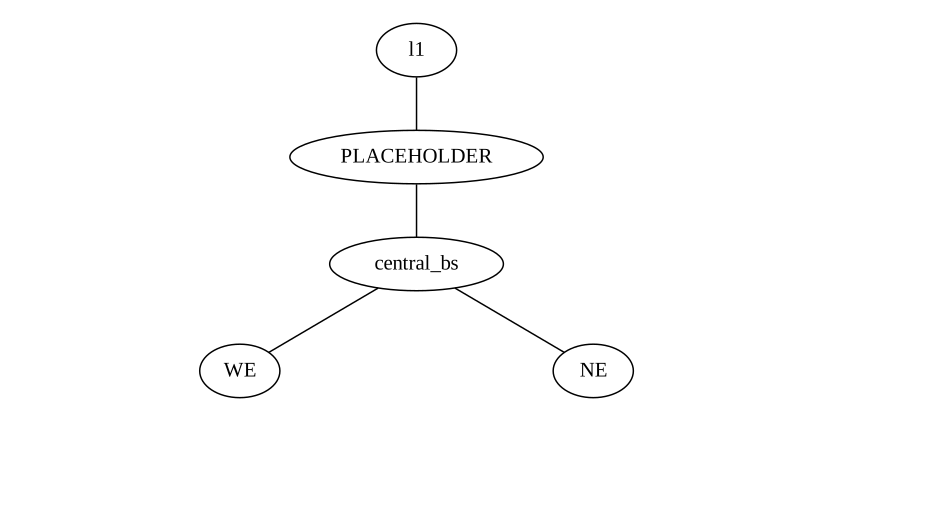
We can insert an entire input mode cleaner by replacing the nothing component with
some input mode cleaner Katscript.
IMC_KATSCRIPT = """
bs bs1 R=0.9 T=0.1
s s1 bs1.p2 bs2.p1
bs bs2 R=0.9 T=0.1
s s2 bs2.p2 bs3.p2
bs bs3 R=0.9 T=0.1
s s3 bs1.p3 bs3.p1
"""

new_kat = model.PLACEHOLDER.replace(IMC_KATSCRIPT, optical_ports=["bs1.p1", "bs3.p3"])
print(new_kat)
l l1

s LA l1.p1 bs1.p1

bs bs1 R=0.9 T=0.1
s s1 bs1.p2 bs2.p1
bs bs2 R=0.9 T=0.1
s s2 bs2.p2 bs3.p2
bs bs3 R=0.9 T=0.1
s s3 bs1.p3 bs3.p1
s LB bs3.p3 central_bs.p1

bs central_bs R=0.5 T=0.5 L=(1-(central_bs.R+central_bs.T))
s LW central_bs.p2 WE.p1 L=100
m WE R=0.9 T=0.1 L=(1-(WE.R+WE.T))
s LN central_bs.p3 NE.p1 L=100
m NE R=0.9 T=0.1 L=(1-(NE.R+NE.T))
pd pd1 central_bs.p4.o
This way you can prepare a simplified ‘base’ model for your interferometer where you can
‘turn on’ different parts to model more realistically. The downside to this approach is
you will have to split up some of your spaces to insert nothing components.
The rest of this page continues with a more detailed explanation of the replace
functionality. After building your model, the replace method is available as an
attribute to the component you want to create. Currently you can only replace 1
component (i.e. one katscript line) at a time, but you are allowed to insert as much
katscript as you want
model = Model(
    """
l laser_1 P=5
"""
)
new_kat = model.laser_1.replace("m m1")
print(new_kat)
m m1
You can see that the method returns a string. You would have to parse this into a new model if you want to use it.
new_model = Model(new_kat)
You can also call the replace method on the Model directly, in which case you have
to pass the component you want to replace (either as a string or Python object). The
advantage is that your editor will recognize the method.
model.replace(model.laser_1, "m m1")
'm m1'
model.replace("laser_1", "m m1")
'm m1'
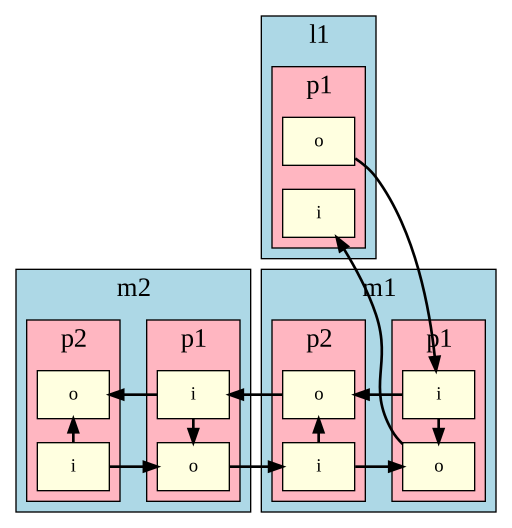
Most of the time references to a component are not limited to a single line, since components are always connected to other components. Let’s try a more involved example: replacing the first mirror in a cavity with a beamsplitter
model = Model(
    """
l l1
s s1 l1.p1 m1.p1
m m1
s s2 m1.p2 m2.p1
m m2
"""
)
model.plot_dcfields_graph(add_fields=False)
PosixPath('/tmp/tmpr9iby_if.svg')
new_kat = model.m1.replace("bs bs1", optical_ports=["bs1.p1", "bs1.p3"])
print(new_kat)
l l1
s s1 l1.p1 bs1.p1
bs bs1
s s2 bs1.p3 m2.p1
m m2 R=0.5 T=0.5 L=0.0
There are a few things to unpack here. Firstly you can see that for the m2 component,
the default RTL values have been added to the new katscript, even though they were not
present in the original katscript. This is because the replace method relies on the
unparsing functionality, which tries to be as unambiguous as possible.
Secondly, we had to specify some optical_ports. This is because the m1 component
appeared in multiple lines, including the lines defining the spaces. If this is the
case, you will have to provide a list of strings that will be used as the replacement
ports for these optical ports. You only have to supply the ports that actually need
replacing. For instance, in this example we didn’t need to provide any replacement for
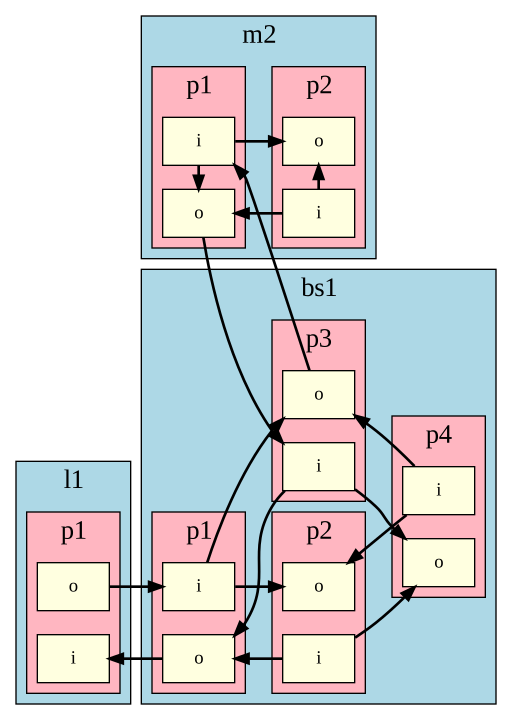
m1.mech, since it was not referenced anywhere. Below we will visualize the new model
for clarity.
new_model = Model(new_kat)
new_model.plot_dcfields_graph(add_fields=False)
PosixPath('/tmp/tmpsz31ung3.svg')
The above example will also work when using the link command. You will see another
artifact from the unparsing: the link command gets unparsed into the explicit space
components generated behind the scenes. The autogenerated names will still be based on
the old component.
model = Model(
    """
l l1
link(l1, m1)
m m1
link(m1, m2)
m m2
"""
)
new_kat = model.m1.replace("bs bs1", optical_ports=["bs1.p1", "bs1.p3"])
print(new_kat)
l l1

bs bs1

m m2 R=0.5 T=0.5 L=0.0


space l1_p1__m1_p1 portA=l1.p1 portB=bs1.p1
space m1_p2__m2_p1 portA=bs1.p3 portB=m2.p1
The ports you are replacing will also automatically replace any nodes associated with
that port. This behaviour is currenlty not configurable. Using the same example as
before, we now also have 2 amplitude detectors placed at m1.p1.i and m1.p2.o.
Because we are replacing these ports with bs1.p1 and bs1.p3, the detectors will
automatically shift to bs1.p1.i and bs1.p3.o.
model = Model(
    """
l l1
s s1 l1.p1 m1.p1
m m1
s s2 m1.p2 m2.p1
m m2

ad ad_in m1.p1.i f=0
ad ad_out m1.p2.o f=0
"""
)
new_kat = model.m1.replace("bs bs1", optical_ports=["bs1.p1", "bs1.p3"])
print(new_kat)
l l1
s s1 l1.p1 bs1.p1
bs bs1
s s2 bs1.p3 m2.p1
m m2 R=0.5 T=0.5 L=0.0

ad ad_in bs1.p1.i f=0
ad ad_out bs1.p3.o f=0
Sometimes, the name of the component you are replacing will be mentioned in other lines
of katscript. For example, when attaching a pendulum to a mirror, we use the
connected_to argument to reference the mirror name. In these cases we need to provide
the replace function with a component argument, which is the name of the new
component the pendulum needs to be attached to. Let’s replace a suspended mirror with
a suspended beamsplitter:
model = Model(
    """
l l1
s s1 l1.p1 m1.p1
m m1
pendulum pend1 connected_to=m1 mass=4.0
s s2 m1.p2 m2.p1
m m2

"""
)
new_kat = model.m1.replace(
    "bs bs1", component="bs1", optical_ports=["bs1.p1", "bs1.p3"]
)
print(new_kat)
l l1
s s1 l1.p1 bs1.p1
bs bs1
pendulum pend1 connected_to=bs1 mass=4.0
s s2 bs1.p3 m2.p1
m m2 R=0.5 T=0.5 L=0.0
Finally, we have an example that uses all features at once:
model = Model(
    """
l l1
s s1 l1.p1 m1.p1
m m1
pendulum pend1 connected_to=m1 mass=4.0
link(m1, m2)
m m2
ad ad_circ m1.p2.i f=0
xd m1_motion m1.mech.z
"""
)

new_kat = model.m1.replace(
    "bs bs1",
    component="bs1",
    optical_ports=["bs1.p1", "bs1.p3"],
    mechanical_ports=["bs1.mech"],
    verbose=True,
)
print(new_kat)
l l1
s s1 l1.p1 bs1.p1
bs bs1
pendulum pend1 connected_to=bs1 mass=4.0

m m2 R=0.5 T=0.5 L=0.0
ad ad_circ bs1.p3.i f=0
xd m1_motion bs1.mech.z


space m1_p2__m2_p1 portA=bs1.p3 portB=m2.p1