Readouts
Readouts are a hybrid component in Finesse 3 which combine together both a detector and an optical component. In essence, they represent a photodetector or some other measurement device that produces an electronic signal.
Readouts have one or more optical ports that are coupled to electrical ports. This
coupling represents the calculation done in a
finesse.detectors.powerdetector.PowerDetector for the ReadoutDC and a
finesse.detectors.powerdetector.PowerDetectorDemod1 for the ReadoutRF.
These electrical ports have two main usecases:
Calculating transfer functions with the
finesse.analysis.actions.lti.FrequencyResponseaction, see Readouts for frequency domain analysisModelling closed loop systems by taking the output at the electrical node and feeding, (optionally) filtering it and feeding it back into another component’s electrical port. The loop is usually closed with Locking actions. Filters can be found in
finesse.components.electronics
Readouts can be connected to the model in two different ways:
Detector-style by using the
optical_nodeargument. This allows you to place the Readout anywhere in your model and to place multiple readouts on the same optical node.Component-style by using a
finesse.components.space.Spaceor thefinesse.model.Model.link()method to connect the optical node of the readout to another optical_node in your model. Since Finesse only allows a port to be connected to one other port, you can only connect one readout per port.
from finesse import Model
from finesse.components import Laser, ReadoutDC, ReadoutRF

# Detector style
model = Model()
l1 = model.add(Laser("l1"))
readout1 = model.add(ReadoutDC("readout1", optical_node=l1.p1))
readout2 = model.add(ReadoutDC("readout2", optical_node=l1.p1))

# readout 'borrows' nodes
print(f"{readout1.p1.i=}")
print(f"{readout1.p1.o=}")
print(f"{readout2.p1.i=}")
print(f"{readout2.p1.o=}")
readout1.p1.i=<OpticalNode l1.p1.i @ 0x7efdae13e660>
readout1.p1.o=<OpticalNode l1.p1.o @ 0x7efdae0bfed0>
readout2.p1.i=<OpticalNode l1.p1.i @ 0x7efdae13e660>
readout2.p1.o=<OpticalNode l1.p1.o @ 0x7efdae0bfed0>
Above you see that the readout only ‘borrows’ the nodes of the port it is connected to and this ‘borrowing’ can be done as many times as you want.
Alternatively you can connect explicitly:
# Component style
model = Model()
l1 = model.add(Laser("l1"))
readout1 = model.add(ReadoutDC("readout1"))
model.link(l1.p1, readout1.p1, verbose=True)
Connecting l1 to readout1
But this does not allow you to connect a second readout to the same port:
readout2 = model.add(ReadoutDC("readout2"))
model.link(l1.p1, readout2.p1, verbose=True)
Connecting l1 to readout2
FinesseException: 	(use finesse.tb() to see the full traceback)
Whilst trying to connect <Port l1.p1 Type=NodeType.OPTICAL @ 0x7efdd7d7bc70> to <Port readout2.p1 Type=NodeType.OPTICAL @ 0x7efdd7d7add0>, the following exception occurred:
Port <Port l1.p1 Type=NodeType.OPTICAL @ 0x7efdd7d7bc70> has already been connected to
Warning
Mixing the two styles will lead to an exception and the following should be avoided:
l l1
ReadoutDC readout l1.p1.o
link(l1.p1, readout.p1)
The output_detectors argument can be used to add relevant detectors to the solution
object:
ReadoutDC: APowerdetectorand aQuantumShotNoiseDetectorwill be added pointing toReadoutDC.p1.i
model = Model()
l1 = model.add(Laser("l1"))
readout = model.add(ReadoutDC("readout", optical_node=l1.p1, output_detectors=True))
sol = model.run()
for det in sol.detectors:
    print(det, sol[det])
readout_DC 0.0
ReadoutRF: TwoPowerDetectorDemod1(IandQquadratures), aPowerDetectorand aQuantumShotNoiseDetectorDemod1
model = Model()
l1 = model.add(Laser("l1"))
readout = model.add(
    ReadoutRF("readout", optical_node=l1.p1.o, output_detectors=True)
)
sol = model.run()
for det in sol.detectors:
    print(det, sol[det])
readout_I 1.0000000000000002
readout_Q 6.123233995736767e-17
readout_DC 1.0000000000000002
Note that the quantum detectors will only be added if you are running a signal model (sgen or frequency response)
Note
Currently output_detectors only makes detectors appear in Solution objects, and
there will be no detectors listed in finesse.model.Model.detectors().
DC readout
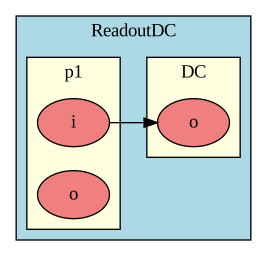
Fig. 6 Nodes and ports overview
-
readout_dc
ReadoutDC A Readout component which represents a photodiode measuring the intensity of some incident field. Audio band intensity signals present in the incident optical field are converted into an electrical signal and output at the
self.DCport, which has a singleself.DC.onode.See Readouts for more information.
- Syntax:
readout_dc name optical_node=none pdtype=none output_detectors=false
- Required:
name: Name of the readout component- Optional:
optical_node: Optical node this readout should look at. Because the readout borrows the node, it can be connected anywhere in the model, like a detector. When passing None, the readout should be connected explicitly with afinesse.components.space.Spaceor withfinesse.model.Model.link()command (and then only a single readout can be connected per port).pdtype: A name of a pdtype definition or a dict representing a pdtype definition, by default None. See Segmented photodiodesoutput_detectors: Whether to add aPowerDetectorand aQuantumShotNoiseDetectorto the solution object, by default False
RF photodetector readout
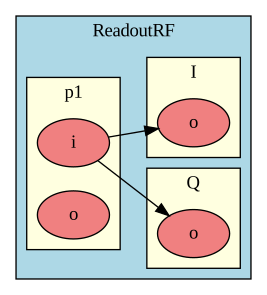
Fig. 7 Nodes and ports overview
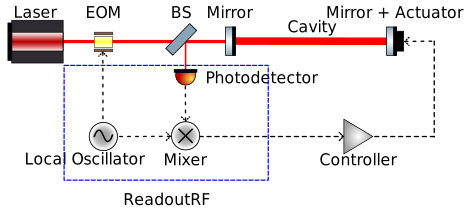
Fig. 8 In this control loop, the ReadoutRF represents a combination of the oscillator, mixer and photodetector.
-
readout_rf
ReadoutRF A readout component which represents a demodulated photodiode. The
self.Iandself.Qelectrical ports contain the signal of the two quadratures.See Readouts for more information.
- Syntax:
readout_rf name optical_node=none f=0 phase=0 output_detectors=false pdtype=none
- Required:
name: Name of the readout component- Optional:
optical_node: Optical node this readout should look at. Because the readout borrows the node, it can be connected anywhere in the model, like a detector. When passing None, the readout should be connected explicitly with afinesse.components.space.Spaceor withfinesse.model.Model.link()command (and then only a single readout can be connected per port).f: Demodulation frequency in Hz, by default 0phase: Demodulation phase in degrees, by default 0output_detectors: Whether to add aPowerDetector(DC), twoPowerDetectorDemod1‘s (I and Q) and aQuantumShotNoiseDetectorDemod1to the solution object, by default Falsepdtype: A name of a pdtype definition or a dict representing a pdtype definition, by default None. See Segmented photodiodes