Axes
The following actions are all variations of a parameter ‘sweep’ or ‘axis’; you want to modify the values of one more parameters of the model and solve for the detector outputs for each value.
Noxaxis
-
noxaxis
Noxaxis The default Action for a model when no action is specified. Solves the model without changing any parameters. Will return a solution with a single value for every detector in the model.
- Syntax:
noxaxis(pre_step=none, post_step=none, name='noxaxis')
- Optional:
pre_step: An action to perform before the Noxaxis is run, by default Nonepost_step: An action to perform after the Noxaxis is run, by default Nonename: Name of the action, used to find the solution in the final output, by default “noxaxis”
This action will be run when you call Model.run without specifying an Action.
from finesse import Model
from finesse.analysis.actions import Noxaxis

model = Model(
    """
l l1
s s1 l1.p1 m1.p1
m m1 R=0.5 T=0.5
pd p_in l1.p1.o
pd p_refl m1.p1.o
"""
)
# the following are equivalent
sol = model.run()
sol = model.run(Noxaxis())

sol.print_detector_info()
print(sol["p_in"])
print(sol["p_refl"])
{
  "p_in": {
    "name": "p_in",
    "detector_type": "finesse.detectors.powerdetector.PowerDetector",
    "dtype": "numpy.float64",
    "unit": "W",
    "label": "Power"
  },
  "p_refl": {
    "name": "p_refl",
    "detector_type": "finesse.detectors.powerdetector.PowerDetector",
    "dtype": "numpy.float64",
    "unit": "W",
    "label": "Power"
  }
}
1.0000000000000002
0.5000000000000002
This produces a single value for every detector in the model. Note that sol.plot
will not work in this case.
sol.plot()
/usr/local/lib/python3.13/site-packages/finesse/plotting/plot.py:897: UserWarning: No x-axes have been defined, unable to plot the outputs of any detectors of type <class 'finesse.detectors.powerdetector.PowerDetector'>
  warn(
{}
Xaxis
-
xaxis
Xaxis Sweeps a parameter and solves the model for every value in the sweep. Will a solution with an array of values for every detector in the model.
- Syntax:
xaxis(
    parameter,
    mode,
    start,
    stop,
    steps,
    relative=false,
    pre_step=none,
    post_step=none,
    name='xaxis'
)
- Required:
parameter: Parameter to sweep over.mode: Whether to sweep linearly or logarithmicallystart: Starting value of the parameter sweepstop: Final value of the parameter sweep.steps: Number of steps in the sweep. Solution arrays will contain ‘steps+1’ values- Optional:
relative: Whether to apply the changes to the parameter value on top of the current value or ignore the current value of the parameter, by default Falsepre_step: An action to perform before each step is computed, by default Nonepost_step: An action to perform after each step is computed, by default Nonename: Name of the action, used to find the solution in the final output, by default “xaxis”
Sweeps a parameter and solves the model for each step. The returning ArraySolution
contains a NumPy array for every detector, and some useful metadata of the analysis
that was performed.
from finesse import Model, init_plotting
from finesse.analysis.actions import Xaxis

from matplotlib import pyplot as plt

init_plotting()

model = Model(
    """
l l1
s s1 l1.p1 m1.p1
m m1 R=0.5 T=0.5
pd p_in l1.p1.o
pd p_refl m1.p1.o
"""
)
sol = model.run(
    Xaxis(
        parameter=model.l1.P,
        mode="lin",
        start=1,
        stop=10,
        steps=3
    )
)
sol.print_detector_info()
print(f"{sol.axis_info=}")
print(f"{sol.params=}")
print(f"{sol["p_in"]=}")
print(f"{sol["p_refl"]=}")
{
  "p_in": {
    "name": "p_in",
    "detector_type": "finesse.detectors.powerdetector.PowerDetector",
    "dtype": "numpy.float64",
    "unit": "W",
    "label": "Power"
  },
  "p_refl": {
    "name": "p_refl",
    "detector_type": "finesse.detectors.powerdetector.PowerDetector",
    "dtype": "numpy.float64",
    "unit": "W",
    "label": "Power"
  }
}
sol.axis_info={'l1.P': {'name': 'l1.P', 'component': 'l1', 'unit': 'W'}}
sol.params=('l1.P',)
sol["p_in"]=array([ 1., 4., 7., 10.])
sol["p_refl"]=array([0.5, 2. , 3.5, 5. ])
Default plotting will work on an ArraySolution. Detectors of the same type will be
plotted on the same plot:
fig_dict = sol.plot()
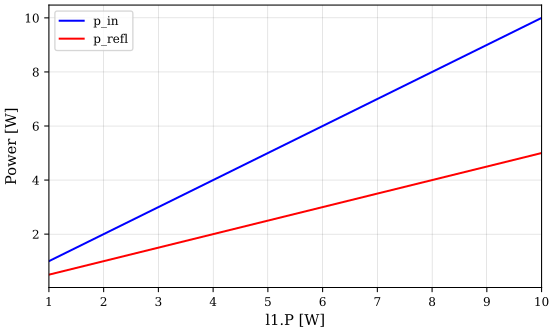
The dictionary returned by the plot() method contains the figures produced. The
dictionary is indexed by two types of keys:
The string names of the detectors with the corresponding
matplotlib.figure.Figureobject as valueThe types of detectors with a list of all
matplotlib.figure.Figureobjects plotting that type of detector
for key, val in fig_dict.items():
    print(f"{key}: {val}")
<class 'finesse.detectors.powerdetector.PowerDetector'>: Figure(576x355.968)
p_in: Figure(576x355.968)
p_refl: Figure(576x355.968)
You can use this to customise the figures created by Finesse:
fig = fig_dict["p_in"]
fig.axes[0].set_title("New title")
fig.axes[0].grid(False)

plt.show()
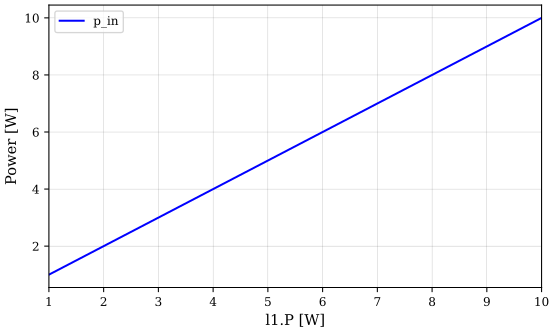
You can also only plot specific detectors by specifying their names in the plot()
call.
sol.plot("p_in");
The original sweep axis is available under the x attribute. This attribute contains
a tuple of arrays, to be compatible with multi-dimensional sweeps. You can access the
first axis with the short hand x1 or by indexing the tuple x[0].
print(sol.x)  # tuple of arrays
print(sol.x1)  # shorthand
print(sol.x[0])  # first sweep array
(array([ 1., 4., 7., 10.]),)
[ 1. 4. 7. 10.]
[ 1. 4. 7. 10.]
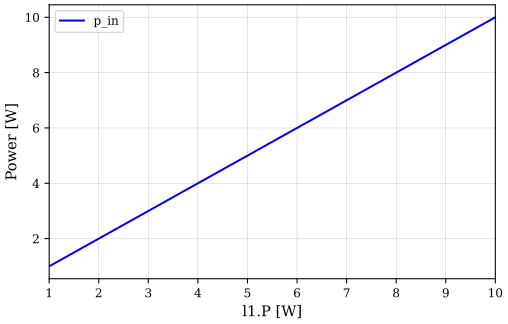
Together with the information in trace_info and axis_info, we can use these
attributes to create our own plot:
detector = "p_in"
trace_info = sol.trace_info["p_in"]
axis_info = sol.axis_info[sol.params[0]]
plt.xlabel(f"{axis_info['name']} [{axis_info['unit']}]")
plt.ylabel(f"{trace_info['label']} [{trace_info['unit']}]")
plt.plot(sol.x[0], sol[detector], label=detector)
plt.legend()
plt.show()
X2axis
-
x2axis
X2axis Two-dimensional version of the Xaxis action. Will solve the model for every point on a grid of values defined by the two sets of sweep arguments. Returns a solution with a two-dimensional array for every detector in the model.
Significantly faster than calling Xaxis in a Python for loop.
- Syntax:
x2axis(
    parameter1,
    mode1,
    start1,
    stop1,
    steps1,
    parameter2,
    mode2,
    start2,
    stop2,
    steps2,
    relative=false,
    pre_step=none,
    post_step=none,
    name='x2axis'
)
- Required:
parameter1: Parameter to sweep over.mode1: Whether to sweep linearly or logarithmicallystart1: Starting value of the parameter sweepstop1: Final value of the parameter sweep.steps1: Number of steps in the sweep. Solution arrays will contain ‘steps+1’ valuesparameter2: Parameter to sweep over.mode2: Whether to sweep linearly or logarithmicallystart2: Starting value of the parameter sweepstop2: Final value of the parameter sweep.steps2: Number of steps in the sweep. Solution arrays will contain ‘steps+1’ values- Optional:
relative: Whether to apply the changes to the parameter value on top of the current value or ignore the current value of the parameter, by default False, by default Falsepre_step: An action to perform before each step is computed, by default Nonepost_step: An action to perform after each step is computed, by default Nonename: Name of the action, used to find the solution in the final output, by default “x2axis”
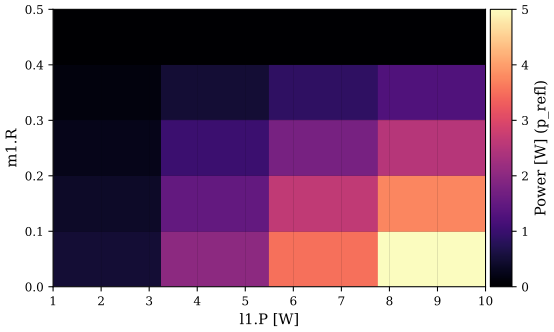
A two-dimensional version of xaxis. Each detector in the solution will
produce a two-dimensional array.
from finesse import Model, init_plotting
from finesse.analysis.actions import X2axis

init_plotting()

model = Model(
    """
l l1
s s1 l1.p1 m1.p1
m m1 R=0.5 T=0.5
pd p_in l1.p1.o
pd p_refl m1.p1.o
"""
)
sol = model.run(
    X2axis(
        parameter1=model.l1.P,
        mode1="lin",
        start1=1,
        stop1=10,
        steps1=3,
        parameter2=model.m1.R,
        mode2="lin",
        start2=0.5,
        stop2=0.0,
        steps2=4,
    )
)
print(f"{sol.shape=}")  # 3x4 steps will produce an array of size 4x5
print(sol["p_in"])  # two-dimensional array
print(sol["p_in"][:, 0])  # 1st column is equal to the first sweep over laser power
print(sol["p_in"][0, :])  # 1st row is equal to the first sweep over mirror reflectivity
sol.shape=(4, 5)
[[ 1.  1.  1.  1.  1.]
 [ 4.  4.  4.  4.  4.]
 [ 7.  7.  7.  7.  7.]
 [10. 10. 10. 10. 10.]]
[ 1. 4. 7. 10.]
[1. 1. 1. 1. 1.]
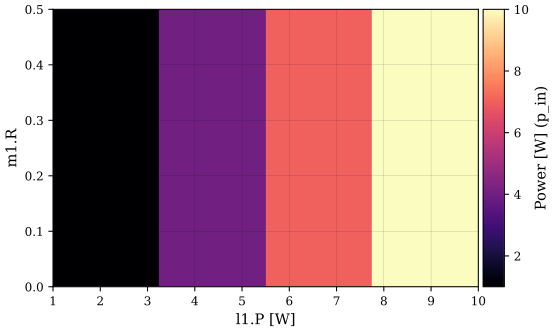
The default plot method will produce a 2D histogram for every detector.
fig_dict = sol.plot()
X3axis
-
x3axis
X3axis Three-dimensional version of the Xaxis action. Will solve the model for every point on a cube of values defined by the three sets of sweep arguments. Returns a solution with a three-dimensional array for every detector in the model.
Significantly faster than calling Xaxis in a nested Python for loop.
- Syntax:
x3axis(
    parameter1,
    mode1,
    start1,
    stop1,
    steps1,
    parameter2,
    mode2,
    start2,
    stop2,
    steps2,
    parameter3,
    mode3,
    start3,
    stop3,
    steps3,
    relative=false,
    pre_step=none,
    post_step=none,
    name='x3axis'
)
- Required:
parameter1: Parameter to sweep over.mode1: Whether to sweep linearly or logarithmicallystart1: Starting value of the parameter sweepstop1: Final value of the parameter sweep.steps1: Number of steps in the sweep. Solution arrays will contain ‘steps+1’ valuesparameter2: Parameter to sweep over.mode2: Whether to sweep linearly or logarithmicallystart2: Starting value of the parameter sweepstop2: Final value of the parameter sweep.steps2: Number of steps in the sweep. Solution arrays will contain ‘steps+1’ valuesparameter3: Parameter to sweep over.mode3: Whether to sweep linearly or logarithmicallystart3: Starting value of the parameter sweepstop3: Final value of the parameter sweep.steps3: Number of steps in the sweep. Solution arrays will contain ‘steps+1’ values- Optional:
relative: Whether to apply the changes to the parameter value on top of the current value or ignore the current value of the parameter, by default False, by default Falsepre_step: An action to perform before each step is computed, by default Nonepost_step: An action to perform after each step is computed, by default Nonename: Name of the action, used to find the solution in the final output, by default “x3axis”
Three-dimensional version of x2axis. Solves the model for a cube of
different parameter values. The cubic scaling can mean very long runtimes or memory
requirements if you are not careful with specifying the number of steps per axis.
from finesse import Model, init_plotting
from finesse.analysis.actions import X3axis

init_plotting()

model = Model(
    """
l l1
s s1 l1.p1 m1.p1

m m1 R=0.5 L=0.0
s s2 m1.p2 m2.p1
m m2 R=0.5 L=0.0

pd p_circ m1.p2.i
"""
)
sol = model.run(
    X3axis(
        parameter1=model.l1.P,
        mode1="lin",
        start1=1.0,
        stop1=0.5,
        steps1=4,
        parameter2=model.m2.R,
        mode2="lin",
        start2=0.5,
        stop2=0.99,
        steps2=5,
        parameter3=model.m1.phi,
        mode3="lin",
        start3=0.0,
        stop3=90.0,
        steps3=10,
    )
)
print(f"{sol.shape=}")  # 3x4x5 steps will produce an array of size 4x5x6
sol.shape=(5, 6, 11)
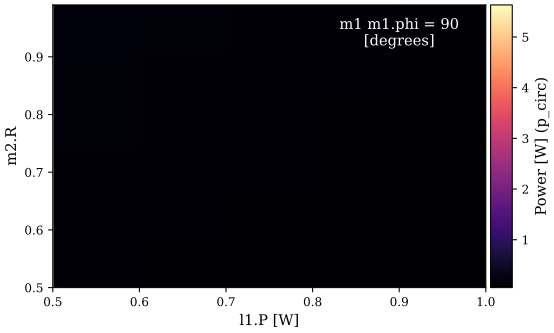
The default plot method will produce an animated 2D-plot, using the third axis specified as the time axis.
from IPython.display import HTML

fig_dict = sol.plot(show=False)
anim = fig_dict[1]['p_circ']
HTML(anim.to_jshtml())
Sweep
-
sweep
Sweep An action that sweeps N number of parameters through the values in N arrays.
- Syntax:
sweep( *args, pre_step=none, post_step=none, reset_parameter=true, name='sweep' )- Required:
args: Expects 3 arguments per axis. The first is a full name of a Parameter or a Parameter object. The second is an array of values to step this parameter over, and lastly a boolean value to say whether this is a relative step from the parameters initial value.name: Name of the action, used to find the solution in the final output.- Optional:
pre_step: An action to perform before the step is computedpost_step: An action to perform after the step is computedreset_parameter: When true this action will reset the all the parameters it changed to the values before it ran.
All of the ‘xaxis’ Actions are based on ‘Sweep’. It simply takes groups of three arguments representing a parameter, an array of values to sweep over and a boolean to specify if the values should be applied on top of the current parameter value. Can be useful if you want to sweep over parameter values from a data file or specify a distribution that is not linear or logarithmic.
from finesse import Model, init_plotting
from finesse.analysis.actions import Sweep

init_plotting()

model = Model(
    """
l l1 P=2
pd power l1.p1.o
"""
)
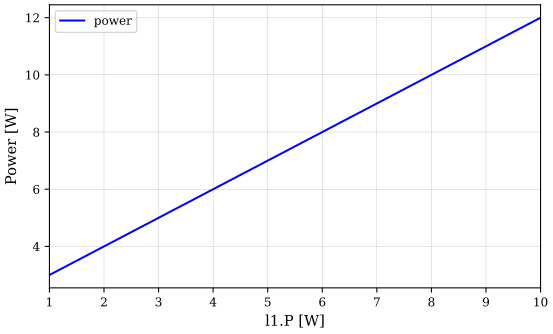
sol = model.run(Sweep(model.l1.P, [1, 5, 10], True))
print(f"{sol.x1=}")
print(f"{sol["power"]=}")
sol.plot()
sol.x1=array([ 1., 5., 10.])
sol["power"]=array([ 3., 7., 12.])
{finesse.detectors.powerdetector.PowerDetector: <Figure size 576x355.968 with 1 Axes>,
 'power': <Figure size 576x355.968 with 1 Axes>}