The model graph
Simulations in Finesse are always done using a Model. A Model is a mathematical description of a (hypothetical) optical experiment.
In the end, the model will be ‘solved’ by the means of inverting a matrix that represents a system of linear equations. The result of this inversion is a complex description of the light field (homs/freqs) at every ‘point’ in the model. What the ‘points’ in the model are, is more formally defined in the model ‘graph’.
When defining your Finesse model, you are not supplying the three-dimensional coordinates of your components in some reference frame. So not:
m m1 x=5.6 y=2.5 z=1.2
but:
m m1 R=0.9 T=0.1
s s1 m1.p2 m2.p1
m m2 R=0.9 T=0.1
We want to describe how components are connected, not where components are (some caveats regarding tilt/yaw of mirrors/beamsplitters).
This graph of connectivity can be described on three levels:
Components
Ports
Nodes
We will be using the following Michelson model.
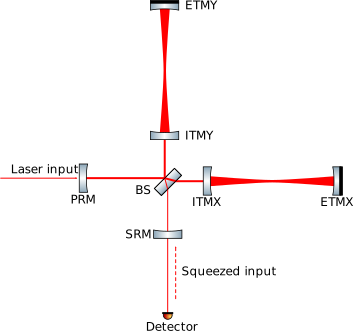
import networkx as nx

import finesse
from finesse.plotting.graph import show_graphviz

finesse.configure(plotting=True)

kat = finesse.Model()
kat.parse(
    """

    l L0 P=1  # Add a Laser named L0 with a power of 1 W.
    s s0 L0.p1 bs1.p1  # Space attaching L0 <-> m1 with length of 0 m (default).

    bs bs1 R=0.9 T=0.1  # central beamsplitter

    # top mirror
    s s1 bs1.p2 m1.p1 L=1
    m m1 R=0.99 T=0.01

    # right mirror.
    s s2 bs1.p3 m2.p1 L=1
    m m2 R=0.991 T=0.009

    pd power bs1.p4.o
    """
);
We can visualize the model graph on the component level. This gives us a high-level overview, but does not contain all the information in the katscript. We can see for example that both mirrors are connected to the central beamsplitter, but we don’t see how they are connected.
kat.plot_graph(network_type="component", layout="dot")
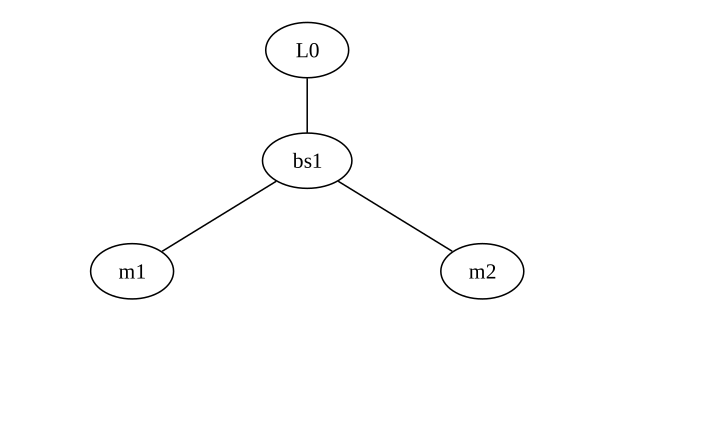
Since our beamsplitter is not symmetric (it will reflect most of the incoming light towards m1), we need a
graph with more information. We can see this on the port level:
kat.plot_graph(network_type="port", format="svg", path=None, layout="dot", show=True);
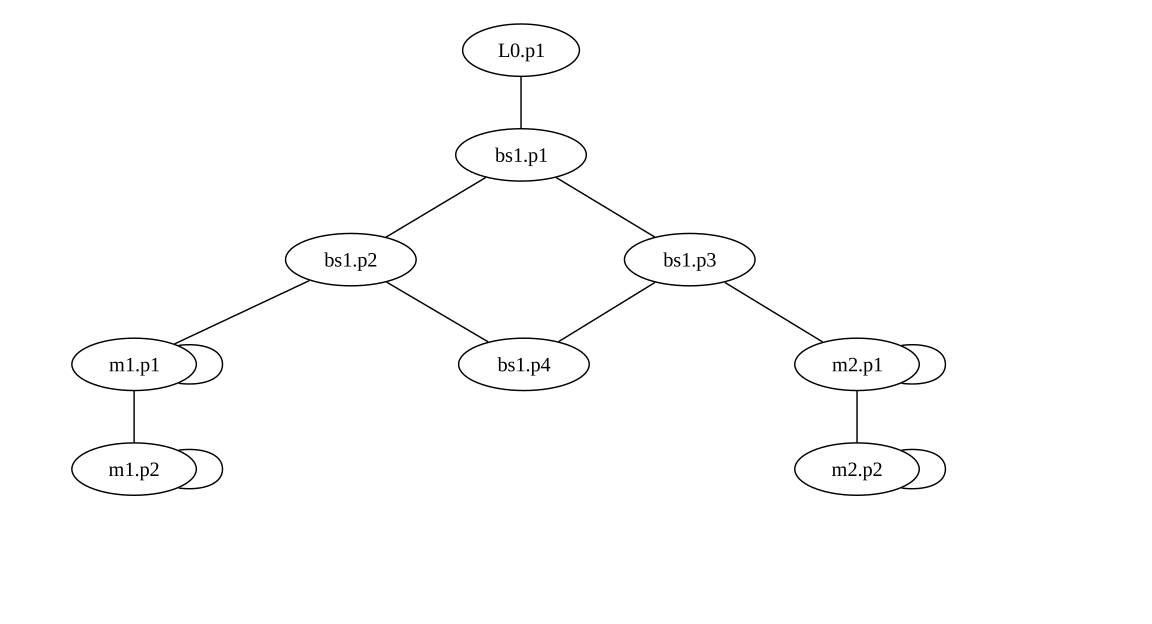
We see that each component actually consists of one or multiple ‘ports’, which are numbered p1 p2 etcetera. They are represented with the ovals. The lines represent connections between different ports. Besides connections between ports of different components, there are also connections between ports of the same component. Both mirrors
and beamsplitters have multiple ports representing internal reflections and transmissions.
With this view we can see that m1 is connected to p2 of the beamsplitter, which contains the reflected light from bs.p1 and the transmitted light from bs1.p4.
Still there is information missing from view of the model. At m1.p1, there is both light coming into the mirror and going out of the mirror (reflection). Actually all the optical connections in Finesse are bidirectional. This we can see more clearly in the node overview
kat.plot_dcfields_graph(add_fields=False);
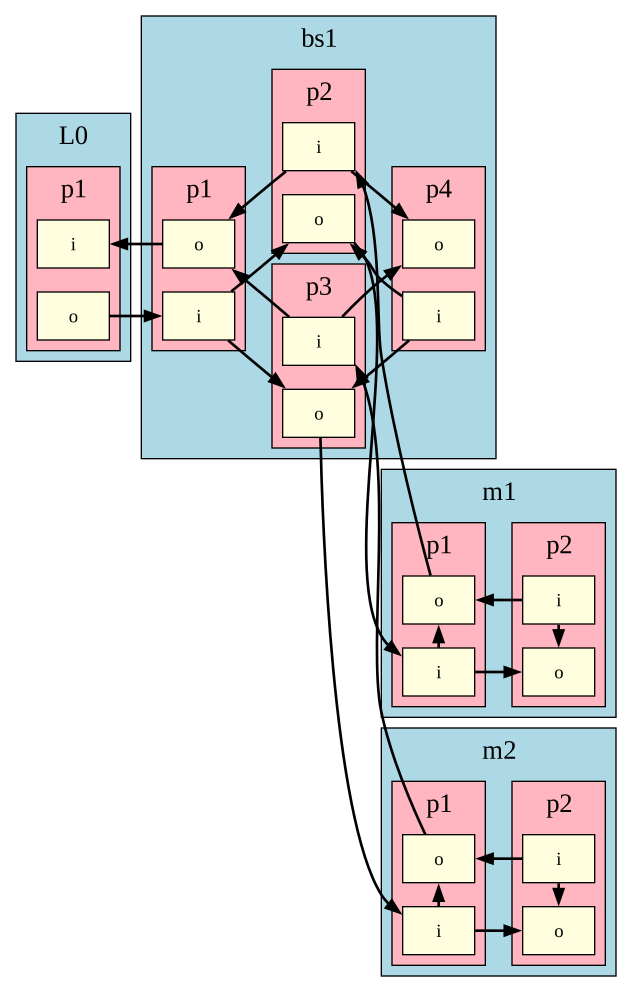
This overview can be confusing, especially for larger models. It show that every port actually has two nodes:
ifor incomingofor outgoing
On the right side of the image, we can see the full mirror, with m2.p1.i reflecting
into m2.p1.o and transmitting into m2.p2.o.
This model graph corresponds directly to the system of linear equations that Finesse
solves. Every single node here is associated with a complex amplitude of the light field
at that location. Initially, only L0.p1.o has a value of 1+0j. After inverting the
interferometer matrix and multiplying it with the RHS vector (containing all these
nodes), we get a steady-state solution of all complex amplitudes at every node in the
model graph.
Every arrow in the graph represents a linear equation that determines the relationship
between two nodes. Some of these arrows are Space components (between nodes of
different components), while other are internal equations. The parameters used in
these equations are specified in the katscript. A very simplified example:
\( \mathrm{m2.p1.o} = \sqrt{m2.R} \cdot \mathrm{m2.p1.i} \)
Below we visualize the steady state solution and the couplings using the
plot_dc_fields_graph method:
kat = finesse.Model(
    """
l l1
s s0 l1.p1 m1.p1
m m1 R=0.9 T=0.1
"""
)

kat.plot_dcfields_graph(add_fields=True, add_operators=True, operator_labels=True);
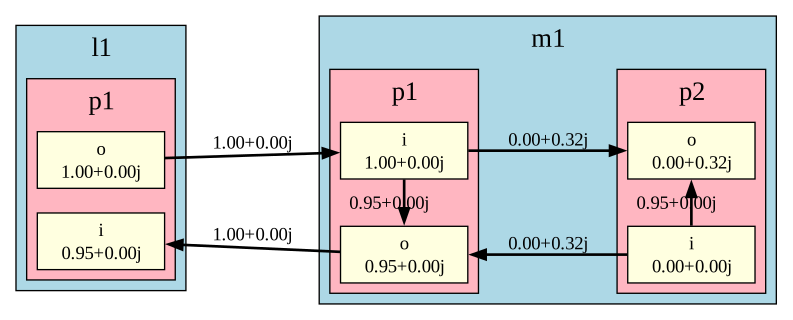
Using some Finesse internals, we can directly relate this to the interferometer matrix. See an overview of Finesse internals for more details.
with kat.built() as sim:
    carrier_solver = sim.carrier
    klu_mat = carrier_solver.M()
    klu_mat.print_matrix(round_values=True)
    klu_mat.print_rhs(round_values=True)
Matrix carrier: nnz=12 neqs=6
    (col, row) = value
    (0, 0) = 1.00+0.00j  : I,node=l1.p1.i,f=0,fidx=0,Neq=1 mode=0 -> I,node=l1.p1.i,f=0,fidx=0,Neq=1 mode=0
    (1, 1) = 1.00+0.00j  : I,node=l1.p1.o,f=0,fidx=1,Neq=1 mode=0 -> I,node=l1.p1.o,f=0,fidx=1,Neq=1 mode=0
    (1, 2) = -1.00-0.00j : I,node=l1.p1.o,f=0,fidx=1,Neq=1 mode=0 -> I,node=m1.p1.i,f=0,fidx=2,Neq=1 mode=0
    (2, 2) = 1.00+0.00j  : I,node=m1.p1.i,f=0,fidx=2,Neq=1 mode=0 -> I,node=m1.p1.i,f=0,fidx=2,Neq=1 mode=0
    (2, 3) = -0.95-0.00j : I,node=m1.p1.i,f=0,fidx=2,Neq=1 mode=0 -> I,node=m1.p1.o,f=0,fidx=3,Neq=1 mode=0
    (2, 5) = 0.00-0.32j  : I,node=m1.p1.i,f=0,fidx=2,Neq=1 mode=0 -> I,node=m1.p2.o,f=0,fidx=5,Neq=1 mode=0
    (3, 0) = -1.00-0.00j : I,node=m1.p1.o,f=0,fidx=3,Neq=1 mode=0 -> I,node=l1.p1.i,f=0,fidx=0,Neq=1 mode=0
    (3, 3) = 1.00+0.00j  : I,node=m1.p1.o,f=0,fidx=3,Neq=1 mode=0 -> I,node=m1.p1.o,f=0,fidx=3,Neq=1 mode=0
    (4, 3) = 0.00-0.32j  : I,node=m1.p2.i,f=0,fidx=4,Neq=1 mode=0 -> I,node=m1.p1.o,f=0,fidx=3,Neq=1 mode=0
    (4, 4) = 1.00+0.00j  : I,node=m1.p2.i,f=0,fidx=4,Neq=1 mode=0 -> I,node=m1.p2.i,f=0,fidx=4,Neq=1 mode=0
    (4, 5) = -0.95+0.00j : I,node=m1.p2.i,f=0,fidx=4,Neq=1 mode=0 -> I,node=m1.p2.o,f=0,fidx=5,Neq=1 mode=0
    (5, 5) = 1.00+0.00j  : I,node=m1.p2.o,f=0,fidx=5,Neq=1 mode=0 -> I,node=m1.p2.o,f=0,fidx=5,Neq=1 mode=0
Vector carrier: neqs=6
    (row) = value
    (0) = 1.34+0.00j : I,node=l1.p1.i,f=0,fidx=0,Neq=1 mode=0
    (1) = 1.41+0.00j : I,node=l1.p1.o,f=0,fidx=1,Neq=1 mode=0
    (2) = 1.41+0.00j : I,node=m1.p1.i,f=0,fidx=2,Neq=1 mode=0
    (3) = 1.34+0.00j : I,node=m1.p1.o,f=0,fidx=3,Neq=1 mode=0
    (4) = 0.00+0.00j : I,node=m1.p2.i,f=0,fidx=4,Neq=1 mode=0
    (5) = 0.00+0.45j : I,node=m1.p2.o,f=0,fidx=5,Neq=1 mode=0
The couplings between different nodes are listed in the interferometer matrix. We only list the non-zero values of this sparse matrix. The steady-state solution is listed in the right-hand side vector. Here we see a single value for every node in the model graph. The values represent the complex field amplitudes of the electrical field.
Note
This page only demonstrates a single-frequency plane-wave simulation. Normally, Finesse stores an array of complex amplitudes for every higher-order mode for every frequency that is being modelled. In the list above, the f=0 and mode=0 refer to indices in this array.
Output & Detectors
To get any useful data out of your simulation, you usually use Actions and Detectors. Actions are (very roughly said) ways to run your model (solving the matrix) one or multiple times, usually changing some component parameters in between solves.
You will notice that detectors are not a part of the model graph. Detectors only work on the output of simulation, i.e. on the complex light amplitudes at every node. Adding detectors does not change the result of your simulation, it only changes which outputs are easily available. To create detectors which have an impact on the simulation, like a sensor in a control loop, see the readout component.
That is why you have to specify a full node for a Detector (m1.p2.o). The detector simply takes the complex amplitude and either returns it directly (AmplitudeDetector) or calculates a quantity based on the complex amplitude (PowerDetector).